Tuesday, 14 January 2014
Evaluation
From the research I have learnt of different ways of storing information such as use of Google cloud of for apple devices the I cloud, I think that the research into screens on different phone/ different sizes if important to the design of the app as i have to take into consideration the size of the screen and how to make the app easy to navigate on a small screen yet not be to effected by the large screen. I have looked at if the app will run off the web tab or be an app in itself stored on the phone so need to consider what one would be best or if a hybrid app would be better. I will also have to consider in content is local content more useful than community or if a mixture of both will work.

Social Media Research
Google Cloud:
"Google Cloud Platform enables developers to build, test and deploy applications on Google’s highly-scalable and reliable infrastructure. Choose from computing, storage and application services for your web, mobile and backend solutions." [1]
 [7]
[7]
 [7]
[7]
Apples cloud and how it works
"Cloud storage is a growing tech trend. Making use of cloud computingtechnology, cloud storage services give you password-protected access to online storage space. You can upload files to this storage space as a backup copy of content from your hard drive, as additional space to supplement your hard drive, or just to make those files available online from other computers or mobile devices.
Apple's cloud storage product, iCloud, is designed to work seamlessly with all your Apple devices connected to the Internet. For example, you can upload photos from your iPhone and access them from your MacBook, upload music from your MacBook to listen to from your iPod Touch, or upload an important document from your Mac desktop to access from your iPad when you're on the go.
But iCloud isn't Apple's first online storage service. MobileMe was iCloud's long-standing predecessor, offering synchronization services for an annual subscription fee. MobileMe's primary purpose was to keep certain files synchronized between multiple devices. This included e-mail, contacts, calendars, browser bookmarks, photo galleries and Apple iWeb and iDisk services. Though MobileMe was tailor-made for Apple products, it also gave users the option to synchronize data from non-Apple computers." [2]
 [10]
[10]
Facebook Open Graph:
"Facebook Connect allows people to sign in to an external website using their Facebook account. It was highly successful and within a year, it had 100 million users on Web and Mobile sites.
In April of 2010, Facebook launched it's "Open Graph" API. What this platform does is let you do much, much more than just connect your site to Facebook. It's a new set of programming tools that let's you get information in and out of facebook." [3]
"Open Graph lets apps tell stories on Facebook through a structured, strongly typed API.
 [8]
[8]
People use stories to share the things they're doing, the people they're doing them with and the places where they happen. Open Graph lets you integrate apps deeply into the Facebook experience, which increases engagement, distribution and growth." [4]
 [8]
[8]Location Based Services:
"Location Services (LCS) use the (geographical) location of mobile user equipment (UE) to offer a range of value added services to consumer and enterprise users.
Location Based technologies offer MNOs the opportunity to deliver contextual services. As such services are specifically orientated towards the position of the mobile handset it enables MNOs to provide services that are more targeted and effective." [5]
Definition - What does Location Based Services (LBS) mean?
"Location based services (LBS) are services offered through a mobile phone and take into account the device’s geographical location. LBS typically provide information or entertainment. Because LBS are largely dependent on the mobile user’s location, the primary objective of the service provider’s system is to determine where the user is. There are many techniques to achieve this.
Some of the most common LBS applications include local news, directions, points of interest, directory assistance, fleet management, emergency, asset tracking, location-sensitive building, and local advertisement." [6]
 [9]
[9]Links
Image links:
Hyper Local Media Research
What is Hyper Local Media?: Definition
"Hyperlocalis the new buzzword in media and advertising. The word is especially in favor among community-oriented blogs and Web technology startups."
“Hyperlocal content is characterized by three major elements. Firstly, it refers to entities and events that are located within a well defined, community scale area. Secondly, it is intended primarily for consumption by residents of that area. Thirdly, it is written by an individual resident in that area.” [1]
Local Content:
"Local Content: Content contained on a website created specifically for a particular geographic location"
[2]
[2]
Communal Communication:
Communal communication also know as community communication.
"The Community Communication section focuses on media that originates, circulates and resonates from the sphere of civil society. It seeks to advance research on the objectives, practices and dynamics of community, alternative and citizens' media, including issues of localism, politics, socio-economics, language, ethnicity, gender, or other interests and intersections. Our concerns include issues of media access, participation and reception; media projects undertaken by marginalized and underrepresented groups; development and support of community-based media institutions and infrastructures; communication practices by social movements; innovative forms of media activism; interactions between classic community and new social media; alternative forms of journalism; and theoretical contributions to the research, evaluation and practice of community communication." [3]
[2]http://www.stepforth.com/resources/web-marketing-glossary/#.UtU7IPRdXTo
[3]http://www.iamcr.org/section-home-seccomm-201
"The Community Communication section focuses on media that originates, circulates and resonates from the sphere of civil society. It seeks to advance research on the objectives, practices and dynamics of community, alternative and citizens' media, including issues of localism, politics, socio-economics, language, ethnicity, gender, or other interests and intersections. Our concerns include issues of media access, participation and reception; media projects undertaken by marginalized and underrepresented groups; development and support of community-based media institutions and infrastructures; communication practices by social movements; innovative forms of media activism; interactions between classic community and new social media; alternative forms of journalism; and theoretical contributions to the research, evaluation and practice of community communication." [3]
links
[1] http://www.attentionmax.com/what_is_hyperlocal_can_someone_please_tell_me#.UtU5efRdXTo[2]http://www.stepforth.com/resources/web-marketing-glossary/#.UtU7IPRdXTo
[3]http://www.iamcr.org/section-home-seccomm-201
Tuesday, 7 January 2014
Apps Research
Development:
"The app development process can be broken out into four major parts – idea, layout and planning, design, and going live.
1. The Idea
This is the first genesis of where the app will be going and one step after “I want an app.” Looking the app store, there are dozens of different directions you can go – simple information, a game, interactive, etc. You can imagine that the more complicated it is, the more it’s going to cost – but also a higher chance at getting a return on investment. Games are complicated, but can go viral easily. Simple apps don’t do much, but they are cheap and easy to build. The first step of the process if to find your sweet spot of budget and marketing effort.
2. Functionality Layout
It’s not enough to paint the broad strokes for a programmer, because they’re not going to deliver what you want. You need to either invest a lot of your own time to go through the details or find someone who can translate Programmer to Civilian and vice versa. This will pay off big time in the end. This step involves going through every single screen and understanding how all parts of the app interact with each other – If I press this button, what happens? You will be amazed how many steps and scenarios there are for even the simplest app. The amount of functionality that needs to be defined and built will also play a part in the cost of your app.
3. Design
Unlike websites where you can often get someone who can design and code at once, apps usually require a team of people to complete. The nice thing about this is that the designer can be graphics, print, web, or whatever – the deliverables to the programmer will be images that he just pops into the appropriate areas. The design comes in typically once the programming and functionality have been defined – the designer gets a full list of what needs to be created. Design can make or break an app, plain and simple, so don’t skimp on this. You need a great icon, splash screens, tab icons, and dozens of other assets that need to be tied together.
4. Going Live
Once you have the app built in xCode (the program that apps are built in for Apple), your developer can help you get the app in the store (iTunes for this example). This requires setting up an iTunes Connect account ($99/year) and then filling out all the information necessary for the app – icons, descriptions, pricing, etc. Most of this is pretty intuitive one you get the files loaded, and a lot of it can be done by your technical team. The setup is also a one time thing, so if you decide to develop another app later on, you already have an account you can dump it into.
Once you have the app up in the store, you can monitor all the analytics on the back side of it through iTunes Connect – how many downloads, how much $$ you are making, etc. There are lots of different ways to drive revenue with apps, including advertisements inside the app and being able to purchase additional information through the app (in-app purchases). You can see everything happening. You can also have someone monitor this account the way you would have someone monitor your PPC or SEO campaigns so that you are always maximizing your traffic and revenue." [1]
Distribution:
Android :
"On Google Play, you can publish your products to customers instantly. Just upload and configure your product in theGoogle Play Developer Console and press the Publish button—your app appears in the store listings within hours, not weeks.
Once your app is published, you can update it as often as you want. You can change prices, configuration, and distribution options at any time through the Google Play Developer Console, without needing to update your app binary.
Later, as you add features or address code issues, you can publish an updated binary at any time. Google Play makes the new version available almost immediately and notifies existing customers that an update is ready for download. To streamline the rollout across your customer base, Google Play also lets users accept automatic updates of your app, so that your updates are delivered and installed as soon as you publish them." [1]
 [2]
[2]ISO (Apple):
"App Store
The revolutionary App Store experience makes it easy for you to reach millions of iPad, iPhone, and iPod touch customers. The App Store is accessible through Wi-Fi and cellular networks so customers can discover and download your apps wherever they go. And once a user has downloaded your app, they will be notified whenever you post an update — directly on their iPad, iPhone, or iPod touch.
Ad Hoc Distribution
With Ad Hoc distribution, you can share your app with up to 100 iOS devices via email or your server." [3]
Web vs Native:
"1. Native apps
If you’re designing a service or utility (task-based) app that requires real speed and you want to use the native features of the OS running on a given device, then for now your best bet is to code a native app, think Instagram.
2. Web apps
In other words, apps that live entirely online and run in a web browser tab. If you don’t need the native features associated with iOS or Android, say, and the purpose of your app is primarily information-based – to the extent it needs constant communication with the server – then you’re better off building a web app. An example of this would be Forecasthttp://forecast.io/, the weather app built using HTML5. No need to go to the app store, just search, download to your home screen and you’re good to go. Forecast also puts to bed any assumptions that a native app interface is de facto better. As Forecast themselves say, it’s more a question of users getting familiar with the progress that’s been made:
“It’s 2013, and mobile browser technology has advanced tremendously in the past few years: hardware accelerated transforms and animations have made it easy to create perfectly smooth, jitter-free, interfaces..”
3. Hybrid apps
As the name suggests: a native app, but built using HTML, CSS and Javascript. This speeds up the development process and makes it easier to publish across platforms, but there can be compromises in styling and performance. Netflix is a good example of one that works: using the same code base for its user interface on all devices allows Netflix to change the interface or conduct testing at will (whilst video streaming is done within the native layer, meaning it feels fast and ‘native-like’ to the user).
In short, each of the approaches here have a role, it depends on what we’re trying to achieve. For marketers, I’d wager we default to a native app too quickly. The question to ask is “will this app provide genuine utility or entertainment that users will want to return to of their own accord in future?” If the answer is closer to “no, this is a short term campaign to promote a product launch” then let’s do everyone, including our CFOs, a favour and build a light, responsively designed web page instead." [1]
 [2]
[2]FRC App Brief and Mobile Device Research
Brief
The new Fife College management team wish to develop a prototype for a social media application to support students studying with the new college.They see it as either a native application running on Android OS or a web app optimized for a smart phone. Part of your research should include a comparison between the two platforms along with recommendations about implementation.
The app will cover elements of the Student experience described in the system map that accompanies this brief .It is also seen as an important marketing tool to support the development of the new college brand.
I am to design a prototype for an app for Android or a web app, to be able to be used by a smart phone. The app is to cover the student experience, so include things such as equipment needed and maps of the campuses etc. I am to look at 2 platforms for android/smart phone to see which one works the best.
it is a tool to help promote the college and support the development of the new college.
Research Mobile devices
Background and History:
"The mobile phone was launched in the UK in 1985,for the UK, the first mobile phone networks were provided by Vodafone and Cellnet, both of which launched in January 1985." [1]
"The first ever text message was sent on December 3 1992." In 2012, "According to Ofcom the average person in the UK now sends 50 text messages every week. [2]
The first mobile phone call was made on April 3 1973. "In 2012 a report carried out by the International Telecommunication Union found that there were six billion mobile phone subscriptions worldwide." [3]
The first mobile was released in 19 73. [4]
calls fist cost roughly 15 pence per minute now a days it costs much less and people often preferring to go to contracts than to pay as you go. [5]
Since the first mobile has been release mobile phones are used more for texting,phoning,playing games and accessing the internet. Phones have also become smaller and more affordable with different networks offering different contracts at different competitive prices As shown by the reports show there is six billion phone subscriptions and now on an average 50 test per week where as back when they were first released it was expensive to send a text and make a phone call.
[4] http://uk.ask.com/question/when-was-the-first-mobile-phone-released
[5]http://www.tomshardware.co.uk/forum/43908-38-1980s-cell-phones-costly-minutes
[5]http://www.tomshardware.co.uk/forum/43908-38-1980s-cell-phones-costly-minutes
How Cells Work:
"A basic mobile phone is therefore a little more than a combined radio transmitter and a radio receiver, quite similar to a walkie - talkie or CB radio
In order to remain portable, mobile phones need to have relatively compact antennas and use a small amount of power. This means that mobile phones can send a signal over only a very short range, just like a walkie-talkie.The cellular network, however, enables you to spread the latest gossip regardless of how far away your friends are. This is done by dividing up land into a patchwork of ‘cells’ – hexagonal areas of land each equipped with their own phone mast (also called a base station).These huge phone masts pick up the weak signal from your phone and relay it onwards to another phone mast nearer to your friend. And if you’re on the move while you talk, your phone switches masts as you go without interrupting your call." [1]
 [2]
[2]How GPS Works:
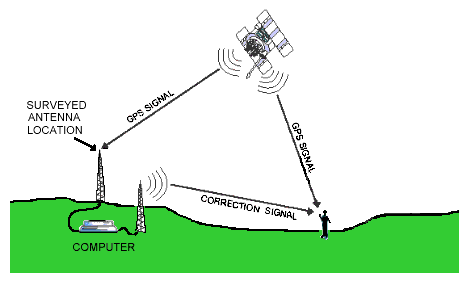
"The GPS satellites transmit signals to a GPS receivers passively receive satellite signals; they do not transmit and require an unobstructed view of the sky, so they can only be used effectively outdoors.[3]
The GPS on a phone can be used to find where you are or help you reach a destination you
are going to.
The GPS on a phone can be used to find where you are or help you reach a destination you
are going to.
 [4]
[4]
[2] http://soni2006.hubpages.com/hub/benefits-of-mobile-phones-how-cell-phones-work-where-to-buy-them
Hardware/Software:
operation LCD screen display diagram
 [1]
[1]
The Displays on phones have been getting more advanced from the black and white pixelated screen to a screen that is touch sensitive, sharp pictured screen.
As well as the screens advancing so has the sizes of the phones meaning the sizes of the screens for example, the Samsung Galaxy Y S5360, the size of the phone is "104 x 58 x 11.5 mm (4.09 x 2.28 x 0.45 in)" and the screen size being "240 x 320 pixels, 3.0 inches (~133 ppi pixel density)" the type of screen the Galaxy Y has is "TFT capacitive touchscreen, 256K colors".this phone has a camera, radio,can access the internet, play music, record videos and much more [3]
The Original Motorola DynaTAc 8000X considered to be the first practical mobile phone was " 300 x 44 x89" in size and only had an LED screen. This phone was uses solely for phone calls as it does not have the gadgets or such things as modern day phones have.[5]
From this we can see mobiles phones getting smaller but more interactive such things as voice command, access to the internet, apps for games and other things show that modern mobiles still with the ability to call and text are becoming more than just a phone capable of calls and texts.
[2] http://www.caseyresearch.com/cdd/advances-display-technology-are-way
[3]http://www.gsmarena.com/samsung_galaxy_y_s5360-4117.php
[3]http://www.gsmarena.com/samsung_galaxy_y_s5360-4117.php
[4]http://natarajank.com/2013/02/10/samsung-a-success-story-worth-reading/
[5] http://esmobil.org/motorola/motorola-dynatac-8000x
[5] http://esmobil.org/motorola/motorola-dynatac-8000x
Cellular network
"A cellular network consists of mobile units linked via a radio network to an infrastructure of switching equipment interconnecting the different parts of the system and allowing access to the normal (fixed) Public Switched Telephone Network." [1]
Definition:
"A cellular network is a radio network distributed over land through cells where each cell includes a fixed location transceiver known as base station. These cells together provide radio coverage over larger geographical areas. User equipment (UE), such as mobile phones, is therefore able to communicate even if the equipment is moving through cells during transmission.Cellular networks give subscribers advanced features over alternative solutions, including increased capacity, small battery power usage, a larger geographical coverage area and reduced interference from other signals. Popular cellular technologies include the Global System for Mobile Communication, general packet radio service, 3GSM and code division multiple access." [2] [3]
[3][1] http://www.doc.ic.ac.uk/~nd/surprise_96/journal/vol4/fjf/report.html
[2] http://www.techopedia.com/definition/24962/cellular-network
[3]http://www2.warwick.ac.uk/fac/sci/eng/staff/wg/teaching/es96t/
Subscribe to:
Comments (Atom)